
Importing blog posts - RSS FEED TRANSLATOR
Article by: Lateș Iulian
OVERVIEW
It is not often that we have to import blog posts from a website to another one and because of this many of us might now know how to do this. The fact is that it is not as easy as just copying a link and pressing a button. This process has to go through a tool from Duda that you might not know yet. Why do we have to do this?
our platform has a few conditions when importing a blog feed and to successfuly do this, the tool will translate any RSS Feed to Duda's conditions. This method was only tested from Duda to Duda thus I do not guarantee that it will work with other RSS links but if anyone tests this please let me know so that I can include it in this article.
So how do we do this?
CONVERTING THE LINK
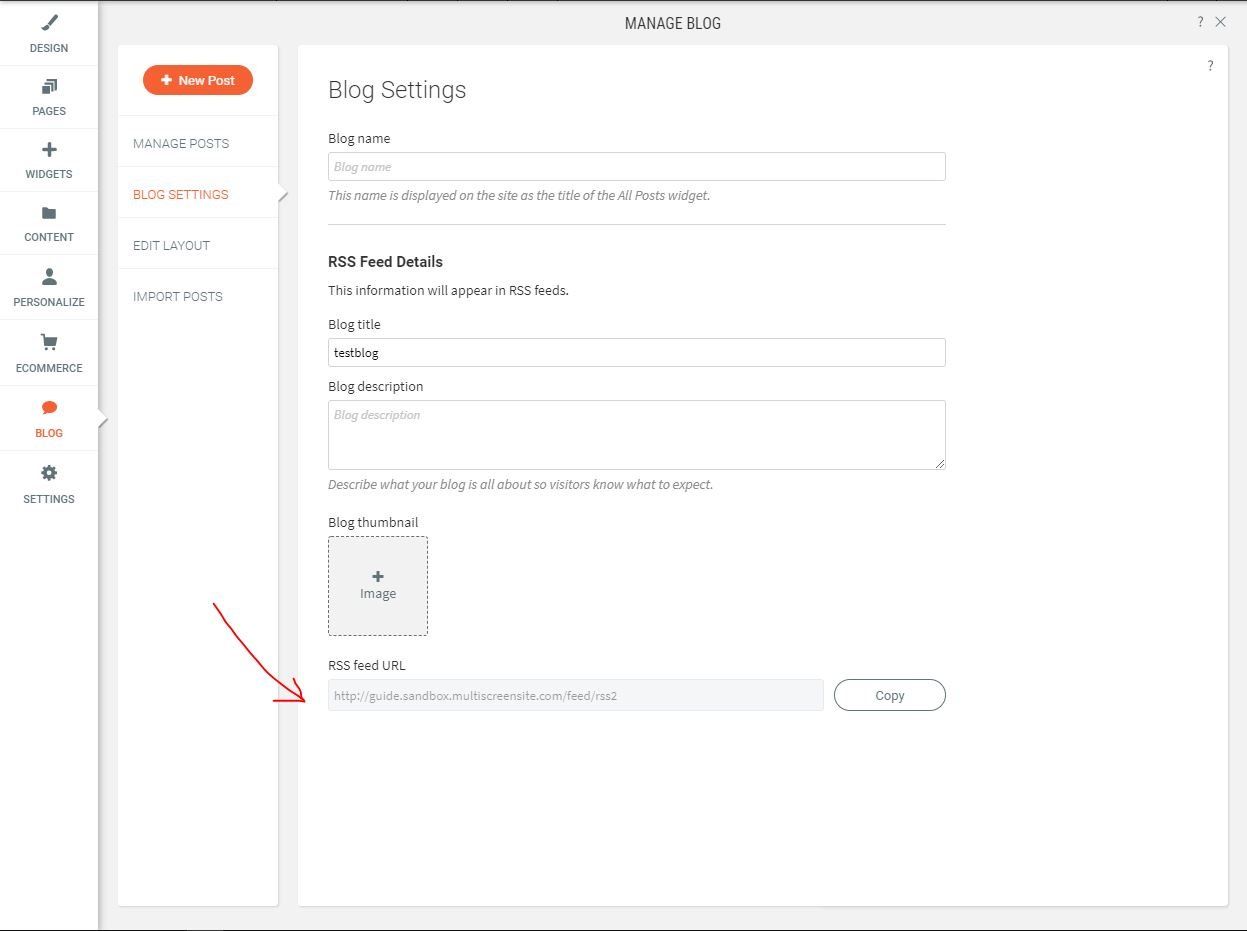
This is the first step, getting the RSS Link. To get the link you have to go to the blog settings and you should be able to see the RSS Link as in the image. Copy the link and then go to https://blogtool.duda.life/ and paste the link where it says "Enter the old site RSS feed" then click on the "Submit" button.
A new link will be generated and it will look somewhat similar to the link shown below. Please copy the link and then go straight to the website that you want to import the blog posts.

Importing your blog posts
Now that you are on the website that you want to import the articles on, you will have to go to Blog > Import Posts and paste the link where the empty field is then pressed enter so that it will start validating the link. The validation of the "Import posts" button will be available to you. Click it. Now you will see the articles importing on the top right of the screen, wait for the process to finish, and then a new pop-up will show.

You will have to click on "Open blog" we do this because imported articles will not be published so you have to publish them yourself (noo, not one by one). When opening the blog you should now see a button that lets you publish the posts.

As you can see, if you will not publish the imported blog posts in this step, you will, later on, have to publish them by hand, one by one so I advise that you do not skip this process. This is it, now you have your blog populated in a manner of minutes. If you have any questions regarding this let me know and I will answer them as quickly as possible.